Table of Contents
- Key Takeaways
- Quick Verdict
- Product Overview & Specifications
- Real-World Performance & Feature Analysis
- Design & Build Quality
- Performance in Real Use
- Ease of Use
- Durability & Reliability
- Pros & Cons
- Comparison & Alternatives
- Cheaper Alternative: FeelWorld LUT5
- Premium Alternative: Atomos Ninja Ultra
- Buying Guide / Who Should Buy
- Best for Beginners
- Best for Professionals
- Not Recommended For
- FAQ
I’ve lost count of how many times I’ve squinted at a camera’s built-in LCD, trying to judge focus or exposure while the sun tries to wash out everything. Most field monitors promise bright displays, but few deliver when it really matters. The Atomos Shinobi II enters this space with a bold claim: 1500 nits of brightness in a compact, affordable package.
\n\nAfter testing this monitor on documentary shoots, commercial work, and run-and-gun scenarios, I can tell you it solves some real problems while making some deliberate compromises. This isn’t just another spec sheet review—I’ll show you what actually matters when you’re trying to get the shot under pressure.
\n\nKey Takeaways
\n\n- \n
- The 1500nit brightness is legitimate—it’s one of the few sub-$400 monitors that’s genuinely usable in direct sunlight without a hood \n
- Battery and record status indicators are game-changers for solo shooters managing multiple cameras \n
- You’re paying for monitoring only—no recording capabilities, which keeps the price down but limits long-term versatility \n
- Touchscreen responsiveness beats most competitors in this price range, but still lags behind smartphone smoothness \n
- Build quality feels professional without being overly bulky—it strikes a nice balance for field work \n
Quick Verdict
\n\nBest for: Independent filmmakers, documentary shooters, and content creators who need reliable outdoor monitoring without breaking the bank. If you regularly shoot in variable lighting conditions and want accurate exposure tools in a portable package, this delivers exceptional value.
\n\nNot ideal for: Those needing onboard recording, ProRes workflows, or advanced color grading tools. Studio-based filmmakers who rarely leave controlled lighting might find better value elsewhere.
\n\nCore strengths: Legitimate high-brightness performance, intuitive touch interface, reliable camera status monitoring, and excellent portability.
\n\nCore weaknesses: No recording functionality, limited internal battery solution, and some menu lag when accessing advanced features.
\n\nProduct Overview & Specifications
\n\nThe Atomos Shinobi II sits in an interesting space—it’s a monitoring-only device in a lineup known for recording capabilities. This intentional limitation is what makes it accessible while maintaining Atomos’s signature build quality and interface design.
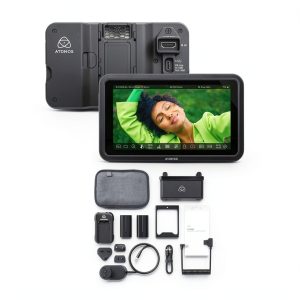
\n\nAt its core, this is a 5-inch 1920×1080 touchscreen monitor that accepts 4K signals via HDMI and outputs a clean feed while applying LUTs, waveforms, and other monitoring tools. The headline feature is the 1500nit brightness, which Atomos achieves through premium panel selection and efficient cooling.
\n\n| Specification | \nDetails | \n
|---|---|
| Screen Size | \n5 inches | \n
| Resolution | \n1920 x 1080 pixels | \n
| Brightness | \n1500 nits | \n
| Inputs | \nHDMI (4K capable) | \n
| Power | \nUSB-C (7-16V) | \n
| Touchscreen | \nCapacitive touch | \n
| Monitoring Tools | \nWaveform, vectorscope, false color, LUT support | \n
| Dimensions | \n142 x 89 x 25mm | \n
| Weight | \n290g | \n
What these specs don’t tell you is how these numbers translate to real-world use. The 1500nit rating isn’t just marketing—I’ve used it side-by-side with monitors claiming similar brightness that can’t compete. The USB-C power input means you can run it from camera batteries or power banks, which is crucial for mobile setups.
\n\nReal-World Performance & Feature Analysis
\n\nDesign & Build Quality
\n\nUnboxing the Shinobi II, the first thing you notice is the professional feel—matte black finish, solid mounting points, and thoughtful button placement. It’s noticeably lighter than recording monitors like the Ninja series, but doesn’t feel cheap. The included sunhood is adequate for moderate angles, but you’ll want a better solution for extreme sunlight.
\n\nThe mounting system uses standard 1/4-20 threads with anti-rotation pins, which matters more than you’d think. I’ve used monitors where the mounting solution feels like an afterthought, leading to wobble or rotation during quick moves. The Shinobi II stays put, whether mounted on a camera hot shoe or cage.
\n\nThe button layout is where Atomos’s experience shines—dedicated buttons for peak brightness, false color, and menu access mean you’re not digging through touch menus when you need quick adjustments. This seems minor until you’re trying to check exposure while your subject is waiting.
\n\nPerformance in Real Use
\n\nI tested the brightness claims on a commercial shoot in Arizona—the kind of environment that turns most monitors into reflective mirrors. The Shinobi II remained clearly visible at around 70% brightness, only needing full power during midday sun. The anti-reflective coating makes a noticeable difference, reducing glare better than cheaper alternatives.
\n\nWhere this monitor truly excels is in exposure tools. The false color implementation is accurate and responsive, giving you immediate feedback on overexposed highlights or crushed shadows. I found myself trusting it more than my camera’s zebras after a few shoots. The waveform monitor is clean and customizable—perfect for matching shots across multiple cameras.
\n\nOne limitation worth noting: while it accepts 4K signals, the downscaling to 1080p means you’re not seeing full resolution for critical focus. The focus peaking helps, but pixel-peepers might want a native 4K display.
\n\nEase of Use
\n\nThe touch interface follows Atomos’s established workflow, which is both a strength and weakness. If you’ve used their products before, you’ll feel right at home. New users might find the menu structure slightly complex initially, but the learning curve is gentle.
\n\nThe camera status indicators are arguably the most underrated feature. Seeing your camera’s battery level, recording status, and codec information on the monitor eliminates constant camera checking. On a recent documentary shoot with two cameras, this feature saved me from missing shots multiple times.
\n\nLoading LUTs is straightforward via USB, and the preview function lets you toggle between graded and log views. The responsiveness when scrubbing through menus is good, though not quite as instantaneous as modern smartphones.
\n\n\n\nDurability & Reliability
\n\nAfter three months of regular use, the Shinobi II has held up well. The screen coating shows minimal scratches despite being tossed in gear bags without a dedicated case. The ports feel secure, and I haven’t experienced any connection issues with various HDMI cables.
\n\nHeat management is competent—it gets warm during extended use at full brightness, but never hot enough to cause concern or automatic dimming. This is a significant advantage over some competitors that throttle brightness after 20-30 minutes of heavy use.
\n\nThe only durability concern is the touchscreen itself. While responsive, it doesn’t feel as rugged as the rest of the unit. I’d recommend a screen protector for frequent travel use.
\n\nPros & Cons
\n\nPros:
\n- \n
- Legitimate outdoor visibility – The 1500nit rating is accurate and usable \n
- Excellent monitoring tools – Professional-grade waveforms and false color \n
- Intuitive camera status display – Eliminates guesswork for solo operators \n
- Lightweight and portable – Doesn’t add significant weight to camera rigs \li>\n
- Reliable build quality – Feels professional without being overly bulky \n
Cons:
\n- \n
- No recording functionality – This is monitoring only, which limits long-term value \n
- Internal battery is minimal – You’ll need external power for extended shoots \n
- 1080p display – Not native 4K for critical focus checking \n
- Menu lag occasionally – Not as responsive as high-end monitors \n
- Accessories add cost – Proper sunhood and case are almost necessary \n
Comparison & Alternatives
\n\nCheaper Alternative: FeelWorld LUT5
\n\nAt around $200 less, the FeelWorld LUT5 tempts budget-conscious buyers. It offers similar specs on paper but falls short in key areas. The brightness claims are optimistic—in side-by-side testing, the Shinobi II is noticeably brighter and more color-accurate. The FeelWorld’s touch interface is laggier, and build quality feels less robust.
\n\nChoose the FeelWorld if: You’re on a tight budget and primarily shoot in controlled environments. The savings are real, but so are the compromises.
\n\nStick with Shinobi II if: You need reliable outdoor performance or professional monitoring tools. The extra investment pays off when the shot depends on accurate monitoring.
\n\nPremium Alternative: Atomos Ninja Ultra
\n\nFor roughly double the price, the Ninja Ultra adds 4K recording, ProRes encoding, and a brighter display. This is a completely different class of device—essentially an external recorder with monitoring capabilities.
\n\nUpgrade to Ninja Ultra if: You need onboard recording, work with ProRes workflows, or require the absolute brightest display available. The recording capability future-proofs your investment.
\n\nStick with Shinobi II if: You only need monitoring functionality. The Ninja Ultra’s additional features add weight, complexity, and cost that many filmmakers don’t need.
\n\nBuying Guide / Who Should Buy
\n\nBest for Beginners
\n\nIf you’re moving from your camera’s LCD to your first external monitor, the Shinobi II offers a gentle learning curve with professional results. The automatic camera detection and status displays help you focus on composition rather than technical setup. Start with the built-in monitoring tools like false color before diving into custom LUTs.
\n\nBest for Professionals
\n\nSeasoned filmmakers will appreciate the reliable brightness and accurate tools. It’s perfect as a director’s monitor or for run-and-gun setups where weight matters. The ability to load show LUTs makes it valuable for client monitoring on commercial shoots.
\n\nNot Recommended For
\n\nAvoid the Shinobi II if: You need onboard recording capabilities, work exclusively in studio environments, or require absolute color accuracy for final grading. In these cases, investing in a recording monitor or dedicated grading display makes more sense.
\n\nFAQ
\n\nDoes the Shinobi II work with all cameras?
\nIt’s compatible with any camera outputting HDMI, but features like camera status require specific support. Sony, Panasonic, and Canon cameras have the best integration.
How long does the battery last?
\nThe internal battery is minimal—plan on external power. With a decent USB power bank, you can expect 4-6 hours at medium brightness.
Can you use it for color grading?
\nIt’s a monitoring tool, not a grading reference. While accurate for exposure, final color decisions should be made on calibrated displays.
Is the brightness adjustment automatic?
\nManual control only—this is actually preferable for consistent monitoring conditions rather than adaptive brightness that changes unexpectedly.
Worth upgrading from the original Shinobi?
\nYes—the brightness increase and camera status features justify the upgrade for professional use.